


Frequently Asked Questions (FAQ)
Everything you need to know about eBay for Charity. It's all here.
General
- What is eBay for Charity?
-
eBay for Charity is an easy way for buyers and sellers on eBay.co.uk to support their favourite charities. Buyers can shop for items knowing they’re supporting a good cause, be it an everyday bargain or a special auction. Sellers, whether they’re individuals or businesses, can donate a percentage from any sale to a charity of their choice and add Gift Aid to their donations. Charities can also sell their own items directly on eBay.co.uk.
In addition, all eBay for Charity items will qualify for a fee credit on basic insertion and final value fees equal to the percentage donated.
- Who is MissionFish?
-
MissionFish is a registered charity (No. 1110538) that helps other charities raise funds online. In late 2005, eBay invited MissionFish to help build a programme which could offer the eBay.co.uk community the chance to support charities when buying and selling on eBay.
MissionFish offers invaluable support to eBay in many areas: providing the technology that makes eBay for Charity possible, certifying charities to participate in the eBay for Charity programme, collecting donations from eBay sellers, claiming Gift Aid on those gifts, and distributing donations and Gift Aid to the benefiting charities. Learn more about MissionFish.In addition, all eBay for Charity items will qualify for a fee credit on basic insertion and final value fees equal to the percentage donated.
Shopping
- How can I tell if an eBay listing supports charity?
-
Every eBay for Charity item is marked with a blue and yellow charity ribbon
in search results and in the item listing title. Within the listing, you will find the name of the benefiting charity and the percentage of the final sale price the seller is donating.

- How does the donation get to the charity?
-
After an eBay for Charity listing ends, the seller receives payment from the buyer as normal. MissionFish will then collect the donation from the seller and pass it on to the seller’s intended charity.
If the item is being sold by a charity, the charity simply keeps the money you have paid for the item.
- How can I be sure the donation will reach the charity?
-
eBay for Charity:
- Keeps a close eye on the giving process to ensure every seller makes the donation they promised.
- Makes sure that every donation reaches a charity as intended
- Checks every participating charity’s legal status and makes sure they meet our community standards against violence and hate.
- How can I shop for charity?
-
There are a few ways you can do this, just pick the best one for yourself. You could:
- Look out for eBay for Charity listings when you search eBay.co.uk. You can tell them apart by the eBay for Charity blue and yellow ribbon

- Visit the eBay for Charity homepage to view all the items being sold for charity. From there, you can search for a particular item or choose a charity to support.
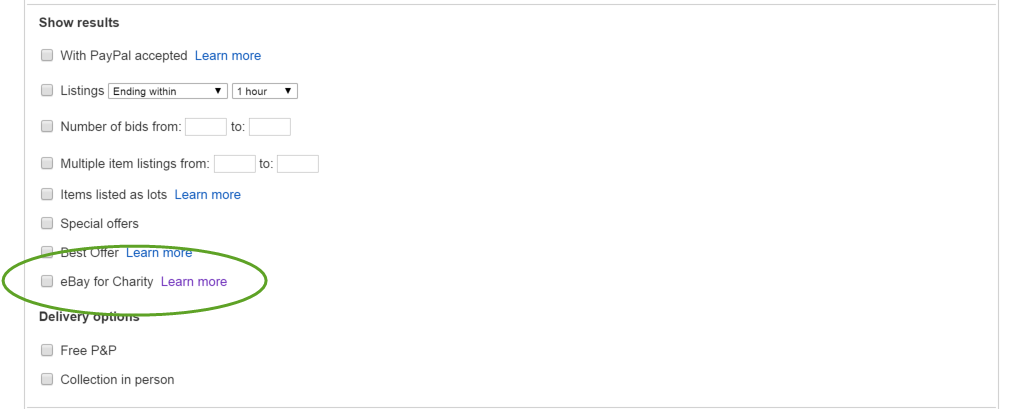
- Run an Advanced Search for eBay for Charity listings by ticking the "
eBay for Charity items" box.
- Look out for eBay for Charity listings when you search eBay.co.uk. You can tell them apart by the eBay for Charity blue and yellow ribbon
Selling
- Can anyone sell for charity?
-
Yes! Any eBay seller can choose to donate between 10% and 100% (5% minimum for eBay Motors) of their final sale price to a charity.
- How much can I donate to charity?
-
It's entirely up to you. You can choose to donate anywhere from 10% to 100% of your final sale price to a charity. For eBay Motors, the minimum is 5%.
The minimum donation is £1 and applies per listing, rather than per item.
- Why is there a £1 minimum donation amount?
-
The minimum donation ensures the charity gets a meaningful donation from every eBay for Charity sale.
- Which charities can I donate to?
-
You can search for charities in the charity directory when you list your item.
There are thousands of charities registered with the programme, so we hope you’ll find a charity you want to support.
If you don’t see your favourite charity in the directory, you can recommend they join the programme.
- Which charities can register with eBay for Charity?
-
All UK organisations with charitable status are welcome to participate in the programme. All participating charities are fully vetted, so you can be sure that any charity you choose to donate to is legitimate.
- Can I donate to more than one charity per listing?
-
No, you can only support one charity per listing.
- How do I support a charity when I list an item?
-
When listing an item, just choose a charity to support and the percentage you want to donate. Here’s how:
- Once you’re ready to sell your item, go to the Sell hub and select Advanced Sell.
- As you’re filling out the details, look out for the charity box just below where you set your price. Select a charity to support and the percentage (10%-100%) of your final selling price that you'd like to donate. Note: The minimum donation is £1 per listing.
- A week after your item sells, MissinFish will automatically collect the donation from you. You can also manage your donations through the 'My Donations' section of My eBay, under the My Account tab. Any fee credits will appear on your next invoice.
- Why can’t I find the charity option when I’m listing?
-
You may be listing using the ‘Quick Sell’ form, which doesn’t include the charity option.
To switch to the 'Advanced Sell' form, scroll to the bottom of the Quick Sell page and click on the link that says "To view all listing options, switch to the Sell Your Item form now, and continue listing your item". You will then be taken to the Advanced Sell form.
In future, when you sell an eBay for Charity item, click on the 'Sell' tab on the top of any eBay page, you can opt to go straight to the “Advanced Sell” form.
If you’re still having problems, contact us.
- Is it possible to revise a listing to include a charity?
-
Yes, you can add a charity to an existing listing through the “Revise your item”, "Relist" or "Sell Similar" tools in My eBay.
You can also use “Revise your item” to add a charity to auction listings, fixed price listings, and shop listings that are live on eBay.
Choosing “Revise your item” will allow you to add a charity to a live eBay listing, or increase the percentage you wish to donate. You cannot remove a charity or reduce the percentage of your donation.
Please note: A listing must have at least 12 hours remaining in order to add a charity through “Revise your item”. In addition, you cannot use Revise to add a charity to a listing if it is a multiple quantity or Dutch listing and one or more of your items from that listing have already sold.
Through Relist and Sell Similar, you can add a charity to support and percentage to donate to your new listing.
- Once my item is sold, how do I pay my donation?
-
When you have sold your item and collected payment from the buyer, you have 2 options to pay your donation:
- Actively pay your donation from the Donation Account section of My eBay under the My Account tab by choosing your preferred method of payment: PayPal, Direct Pay or Credit Card.
- Let MissionFish (eBay’s charity partner) collect the donation automatically from the payment method you have on file with eBay. They’ll collect the donation on the second Monday after the listing closes.
In both instances, the donation is paid to MissionFish, which then claims Gift Aid (where applicable) and redistributes the funds to your chosen charity.
- Why was my listing cancelled?
-
Your benefiting charity can cancel your item once you have listed it if they consider it inappropriate for their charity.
If your listing is cancelled by a charity, you will receive an email with an explanation of why the charity cancelled it. You can:
- Relist the item for a different charity
- Revise your listing and relist it for any charity (including the one you selected previously)
- List the item on eBay without selecting a charity to benefit.
Alternatively, your listing may have breached eBay’s listing policies
- How can I manage my donations?
-
You can manage all your donations from within your My eBay account. Simply look in the Donation Account section of My eBay under the My Account tab to see all past and pending donations.
- What does MissionFish do if the donation can’t be delivered?
-
If we have a problem delivering a donation to a charity, here’s what we do:
- First, we try again
- If that fails, we contact the charity to verify and correct their bank account information
- If we can’t reach them, we’ll keep trying over a period of 30 days
- After our best efforts, if we find that we still can’t deliver the donation to the designated charity, we will deliver it to an organisation with a similar mission
If a seller has completed a Gift Aid declaration, we will still claim and deliver that Gift Aid to the charity that receives the original donation.
- What is Gift Aid?
-
Gift Aid is one of the easiest ways to make your donation tax effective. Using Gift Aid means that for every pound you give, the charity will receive an extra 28p from the Government.
Simply tick the Gift Aid box when you first list an item for charity, so long as you pay more in UK income or capital gains tax than the charity’s planning to claim back.
If you need to, you can update your Gift Aid declaration in your Donations Account in the My Account section of My eBay in each tax year.
- How does Gift Aid work?
-
Through Gift Aid, MissionFish (eBay’s charity partner) can reclaim the basic rate tax from the government on every donation you make through eBay for Charity. MissionFish sends 100% of the reclaimed tax to the charities you support.
If you are a higher rate taxpayer, in addition to the above, you can reclaim for yourself another 25p in tax from the government for every £1 you donate to charity. All you have to do is remember to include details of your charitable donations on your tax return.
Please note that to qualify for Gift Aid, you must pay as much tax (income and/or capital gains) as you are reclaiming on charitable donations. For example, if you wish to claim Gift Aid on donations that total £100 in one tax year, you will need to have paid at least £25 in taxes for that tax year.
- Who can claim Gift Aid?
-
To claim Gift Aid, the donation has to be made by an UK individual taxpayer, sole trader, or partnership. Gift Aid cannot be claimed by companies.
- How does Gift Aid work for self-employed people (sole traders) and partnerships?
-
Gift Aid donations from the self-employed (sole traders) and partnerships are treated in the same way as Gift Aid by individuals. Your donation will be treated as paid out of taxed income and the charity will be able to reclaim 28p on each pound of the donation.
Sole traders that are higher rate taxpayers can also reclaim 25p for every £1 donated to charity. All you have to do is remember to include details of your charitable gifts on your tax return.
For more information, please visit the HM Revenue & Customs website.
- Can companies claim Gift Aid?
-
If you are donating as a company, please do not tick the Gift Aid box. To receive tax relief, companies can deduct their donations from total profits prior to calculating corporation tax.
For more information, please visit the HM Revenue & Customs website.
- How can I claim Gift Aid?
-
To claim Gift Aid on your donations, all you need to do is tick the Gift Aid box when you first list an item for charity. We'll do the rest. If you need to, you can update your Gift Aid in the Donation Account section of My eBay, under the My Account tab.
- Why has my Gift Aid declaration been disabled?
-
eBay for Charity needs your name and home address in order to claim Gift Aid. This is so they can be confident that you are a UK taxpayer. Please update your profile in your Donation Account, which can be found in My eBay under the My Account tab, then contact us to say you've done so.
- How does the charity receive Gift Aid?
-
eBay for Charity collects your donation, then claims Gift Aid on top. The donation and the Gift Aid are then delivered to your chosen charity.
- What is the eBay for Charity fee credit?
-
eBay will credit fees back to sellers when they sell through the eBay for Charity programme. Charities also receive fee credits when they sell items directly.
When you sell an eBay for Charity item, you are eligible for the eBay fee credit if the item sells. eBay’s basic selling fees (basic insertion and final value fees) will be credited back to you according to the level of your donation.
For example, if you donate 50% of your item’s sale price to charity, you will receive a credit of 50% of your basic selling fees.
The fee credit will appear automatically on your first eBay invoice after the item sells.
- How much of my donation reaches the charity?
-
The donations are processed by MissionFish, which makes a small deduction from each seller’s donation to offset credit card charges, bank fees and operating expenses. As a registered charity (No. 1110538), MissionFish only aims to help cover costs with the deductions, rather than make a profit.
The deduction is based on the size of the donation. The percentage gets smaller as the donation gets bigger. MissionFish never takes more than 20% of any donation, and for large donations, the deduction can be as low as 3%.
Additionally, 100% of the Gift Aid claimed is passed on to the benefiting charity.
If the donation is... The MissionFish deduction is...* £2 - £9.99 20% of the donation £10 - £99.99 15% of the donation above £10
+
£2 from the first £9.99 donated£100 - £999.99 10% of the donation above £100
+
£15.50 from the first £99.99 donated£1,000 and more 5%* of the donation above £1,000
+
£105.50 from the first £999.99 donated*MissionFish only deducts 3% of donations above £1,000 when you make your donation by Banker's Draft or BACS transfer.
Donation Final sale price £10.00 Donation percent 20% Original donation due £2.00 Gift Aid £0.56 Total donation £2.56 MissionFish deduction -£0.40 Charity receives: £2.16 Seller Fees Final Value Fee £0.52 Basic Insertion Fee £0.15 Seller fee credits (20%) -£0.14 Seller pays £0.53 Example #1
In this example a seller’s donation of £2 means £2.16 for the charity. The Community Seller has:- Sold an item for £10.00
- Agreed to donate 20% of the sale price
- Completed a Gift Aid declaration
eBay credits 20% of its basic selling fees back to the seller.
Sample transaction Basic Insertion Fee -£0.35 Final sale price £20.00 Final Value Fee -£1.05 Donation percent 100% MissionFish deduction -£0.00 Seller fee credit £1.40 Charity receives: £20.00** Example #2
In this example a charity earns £20.00 on the sale of a £20 item. The charity has:- Sold an item for £20.00
- 100% is automatically donated
This is a Charity Direct Seller, so there is no MissionFish deduction.
eBay credits 100% of its basic selling fees back to the seller.
*Assumes a £0.35 Basic Insertion Fee for a starting price of £5.00.
**The charity may need to pay additional fees not calculated in this example such as PayPal, credit card fees, third-party auction houses, etc.
- When will the charity receive my donation?
-
Donations are sent to charities within two months. This is because MissionFish holds donations from eBay sellers for at least 45 days. This protects the seller in case the deal with their buyer falls through and they need to get their donation back.
It also protects the charity: MissionFish doesn't want to ask for a donation to be returned once they've paid a charity, so they hold onto it until eBay's refund period expires.
Sellers can speed up the payout to a charity by waiving their right to a refund when they proactively make donations through their Donation Account, under the Account tab in My eBay. Many sellers do this once they know that their deal with the buyer has been completed.
- What happens if I do not receive payment from the buyer?
-
If a buyer has not paid you for their item, you have the right to request that your donation be refunded (if you’ve already made it), or waived by MissionFish (if you haven’t).
You’ll need to:- open an Unpaid Item Dispute using the Report an Unpaid Item Dispute form.
- Tick the donation refund box in the form.
Once we verify with eBay that your final value fee credit was granted, we'll approve your donation refund.
If a final value fee credit is not issued, your donation refund request will be denied. Learn more about eBay's Unpaid Item process.
Note: You must submit your request using the Dispute Console within 45 days of the end of your listing on eBay. If your request is submitted after 45 days, we will be unable to issue a donation refund.
- I’ve changed my mind about donating – can I cancel my donation?
-
If you ticked the Gift Aid box, you have the right to cancel your donation for any reason within 21 days after your item sells. To cancel your donation, you must contact MissionFish and state that you want to “cancel a Gift Aided donation”. You may cancel a donation in this way whether you have waived your right to a refund or not.
Note: If you exercise the right to cancel, MissionFish will not charge you any fee, and will waive or refund your donation. To prevent abuse of the programme, eBay reserves the right to block donors who cancel donations from using eBay for Charity.
If you did not tick the Gift Aid box, you can only request a donation refund through an Unpaid Item Dispute.
Charities
- How does eBay for Charity help charities?
-
If you're a charity, eBay for Charity can help you raise funds and boost your profile with well over 20 million eBay users in the UK, and 250 million worldwide. There are 3 main ways for you to get involved:
- Receive donations from eBay sellers: anyone can donate to your charity whenever they sell on eBay.
- Sell your items on eBay: turn goods into cash by trading through your own eBay for Charity shop.
- Hold a special auction: raise funds and your profile on eBay by selling big ticket items with great value.
- Why should we register for eBay for Charity?
-
Registration is easy and free of charge. Once registered, you’ll benefit from advantages that you can’t get anywhere else:
- You’ll receive fee credits (100% of basic insertion fees and final value fees) when you sell an item,
- Any eBay seller will be able to donate to your charity,
- All listings that benefit your charity will be marked with the eBay for Charity ribbon
, your logo, and your mission statement.
- How can I get started?
-
To get started, you’ll need to register with MissionFish (eBay’s charity partner). MissionFish vets charities, processes donations and advises charities on how to raise funds on eBay.
If you’d like only to receive donations from eBay Community sellers, then this is all you need to do.
If your charity would like to sell its own goods, you’ll need to set up an eBay account and add your eBay ID as a “Direct Seller” in your MissionFish account.
- Where can I learn more selling online?
-
You can learn more about how to benefit from eBay for Charity by visiting the MissionFish website.
- I'm thinking of running a special auction with eBay. What should I do?
-
eBay may be able to give you some extra advice and support. You can learn more on our Special Auctions page.


