The new shopping basket is arriving this summer. It's the most convenient way to shop online, helping you get more orders, faster payments and fewer unpaid items. Make sure you're ready to optimise your listings and offer better P&P deals with new product bundles.
We're replacing the blue Buy it now button with this
button.
For fixed price items, a buyer can simply add them to the shopping basket. Auction-style items will appear in a buyer's basket after his first bid.
The shopping basket makes it simpler to understand the full cost of buying an item with P&P and associated discounts. It gives buyers a better chance to compare items and makes shopping easier.
You can offer free or discounted combined P&P and simplify checkout to encourage shoppers to buy multiple items from you. Postage discounts will be highlighted in the shopping basket and linked to your other items. Get your discounts to show in the shopping basket with the eBay postage discount tool.
Combined P&P discounts are easy to understand and will be an incentive for the buyers to have a look at your other items.
To set up your postage discounts, go to Postage and Discount Preferences in the Site Preferences section in My eBay.
The longer you list an item and the higher the quantity of the item you want to sell, the longer it will be available in your buyer's shopping basket. Use multi-quantity and long duration listings to a give buyers more time to purchase.
Buyers are more likely to buy from you when the total amount including postage is clearly specified in the shopping basket. Specify costs on every postage method you offer including costs for international delivery.
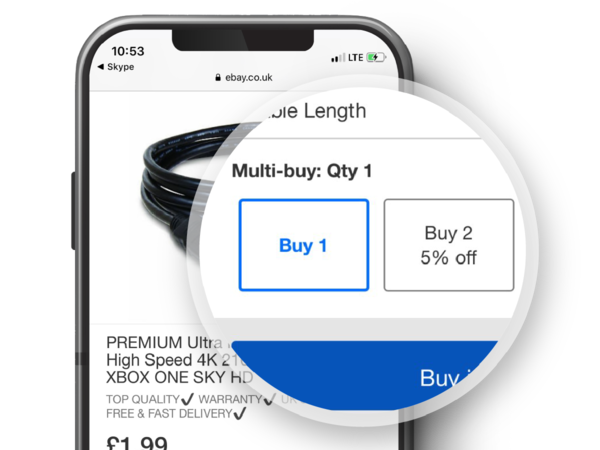
Take advantage of new product bundles to advertise different products you're selling on your item page. You can offer discounts to buyers paying for multiple items together.
Product bundles will help you sell different items and offer discounts across your range. Buyers see more of your items on the site, which will help encourage them to make more purchases.
Add your accessories and related items with the seller tool and eBay will display them on your item page and on the shopping basket page.
Items that relate to your buyer's selection will display on your item page.
It's easy to set up your product bundles with the new tool, which you can use through a link in My eBay. You can start and stop at any time. If items in a related listing sell out, then the cross-selling activity will end for this item.
This new feature is being tested now and will be available to more sellers in the spring, completely free.
| By May 2011 | Take action |
|---|---|
| Now | Get ready to optimise your listing with combined P&P discounts |
| Now | Use multi-quantity and long duration listings |
| Now | If you want to revise, update or relist multiple listings in one go, you can do it easily in My eBay or in Selling Manager and Selling Manager Pro. Learn more about how to revise multiple listings or templates on eBay |
| May | Start thinking about new product bundles |
The eBay shopping basket works the same as on any other website. It means simpler, faster shopping as buyers can pay different sellers for many items at the same time.
While a fixed price item is in the shopping basket, it's still available to other buyers until it's paid for so it's not reserved in your inventory. Buyers only commit to buying a fixed price item when they check out and pay.
Auction-style items appear in the shopping basket as soon as the buyer hase bid on it. It makes it easier to track all bidding activity.
Yes, see a beta version.
Buyers will go through to the checkout and go straight through to the third party shop to pay.
If the item doesn't specify free postage, or doesn't reflect discounts for combined P&P of multiple items, buyers may contact you for more information or find another seller.
Buyers may see related items that appear as 'not available'. This could be because:
Other buyers can still buy items while they're in the shopping basket.
You can offer free P&P on any items in your range that relate to your buyer's selection at checkout.
We are testing new product bundles with a few selected sellers now. They'll be available across all categories to more sellers in the spring.
Related items are other items you want to cross-sell with your main items. For example, your main item might be a camera and the related items may be a camera case, tripod, lens, etc.
Items to be cross-sold as a related item must:
If all the main items are sold, these item listings will no longer be active and any associated product bundles will also stop. If a related item is sold out or ended, these items will no longer be cross-sold with the main item. The listing for the main item will stay active until it's sold or ended.